
- Detalles
- By Jorge Torres
- Categoría: Uncategorised
- Visto: 258
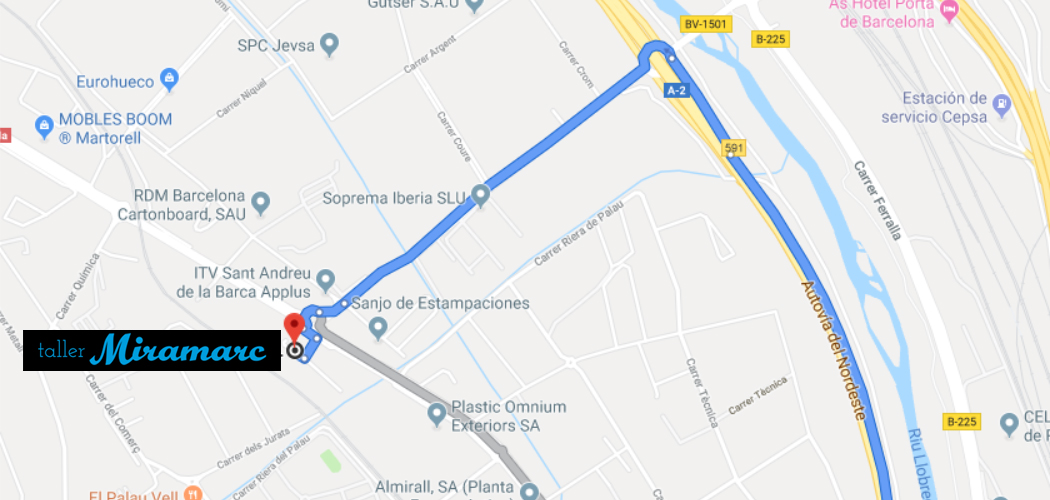
A continuación te mostramos diferentes formas de llegar a nuestras instalaciones. Estamos en el Polígono Industrial "Can Fuster", en la nave 20, frente a la ITV de Sant Andreu de la Barca.
Si vienes en transporte público:
-
- Tienes la estación de FGC de El Palau a unos 12-14 minutos de nuestro taller caminando. Lineas R5-R6-S4-S8
- Hay diversos autobuses que pasan cerca. Te recomendamos buscar la mejor ruta con Google Maps.
Si vienes con tu coche
-
- Desde Barcelona: Lo mas práctico es ir por la A-2 y tomar la salida 591. Sigue por la Calle Ferro hasta llegar a la Nacional II. Crúzala y delante tienes el Polígono "Can Fuster". Estamos en la Nave 20.
- Desde Gerona: Lo recomendable es venir por la AP-7: Después de pasar Cerdanyola y Sant Cugat, toma la salida hacia C-1413a. Una vez allí, toma la Calle Ferrala/B-225 y la Nacional II. Continua unos tres kilómetros hasta la rotonda que lleva hacia el polígono "Can Fuster". Estamos en la Nave 20.
- Desde Tarragona: Lo mas indicado es venir por la A-2 y tomar la salida 591. Sigue por la Calle Ferro hasta llegar a la Nacional II. Crúzala y delante tienes el Polígono "Can Fuster". Estamos en la Nave 20.
Si quieres hacer caso a tu GPS
Dile que estamos en estas coordenadas:
Latitud: 41.459994 (41º 27' 36.0" N)
Longitud: 1.958514 (1º 57' 30.7" E)
Si tienes algún problema para llegar, recuerda apuntarte nuestro teléfono: 933 72 30 51
- Detalles
- By Jorge Torres
- Categoría: Uncategorised
- Visto: 272
Soy Marc Baena.
Os doy la bienvenida a la página web de mi taller. Espero que esta página crezca con el tiempo, igual que mi taller y mi grupo de clientes satisfechos.
Para los que no me conozcais, simplemente os diré que tras mi experiencia laboral en talleres de elevado prestigio, entre ellos talleres oficiales de BMW y Porsche, decidí, (¡hace ya 5 años, como pasa el tiempo!) emprender la aventura de abrir mi propio taller.
Al inicio abrimos nuestro primer taller muy cerca de aquí, en la calle Josep Anselm Calvé, y una vez consolidado el proyecto y con un número creciente de clientes habituales, nos trasladamos a nuestras instalaciones actuales, aquí en Llealtad 48 - Esplugues de Llobregat, con una mayor capacidad para atenderos.
Me encanta la mecánica, el trato directo con el cliente y las furgonetas Volkswagen. Creo firmemente en que la formación continuada es una herramienta vital de nuestro servicio, por ello el personal del taller siempre está a la última en cuanto a conocimientos y herramientas de trabajo.
Acudo frecuentemente a concentraciones de vehículos clásicos, por ello encontrarás aquí una mano experta en este campo.
Espero que dentro de nuestra amplia lista de servicios encontreis lo que estais buscando, y que os decidais a confiarnos vuestros vehículos.
Os esperamos. ¡No os arrepentireis!
- Detalles
- By Jorge Torres
- Categoría: Uncategorised
- Visto: 2983
It's easy to get started creating your website. Knowing some of the basics will help.
What is a Content Management System?
A content management system is software that allows you to create and manage webpages easily by separating the creation of your content from the mechanics required to present it on the web.
In this site, the content is stored in a database. The look and feel are created by a template. Joomla! brings together the template and your content to create web pages.
Logging in
To login to your site use the user name and password that were created as part of the installation process. Once logged-in you will be able to create and edit articles and modify some settings.
Creating an article
Once you are logged-in, a new menu will be visible. To create a new article, click on the "Submit Article" link on that menu.
The new article interface gives you a lot of options, but all you need to do is add a title and put something in the content area. To make it easy to find, set the state to published.
Template, site settings, and modules
The look and feel of your site is controlled by a template. You can change the site name, background colour, highlights colour and more by editing the template settings. Click the "Template Settings" in the user menu.
The boxes around the main content of the site are called modules. You can modify modules on the current page by moving your cursor to the module and clicking the edit link. Always be sure to save and close any module you edit.
You can change some site settings such as the site name and description by clicking on the "Site Settings" link.
More advanced options for templates, site settings, modules, and more are available in the site administrator.
Site and Administrator
Your site actually has two separate sites. The site (also called the front end) is what visitors to your site will see. The administrator (also called the back end) is only used by people managing your site. You can access the administrator by clicking the "Site Administrator" link on the "User Menu" menu (visible once you login) or by adding /administrator to the end of your domain name. The same user name and password are used for both sites.
Learn more
There is much more to learn about how to use Joomla! to create the website you envision. You can learn much more at the Joomla! documentation site and on the Joomla! forums.
Más artículos…
Donde estamos
Taller Miramarc
P.I. "Can Fuster" Nave 20
08740 - Sant Andreu de la Barca